
1.49.0
23 days ago
입력란 조건부 표시 규칙 설정 기능
요청자가 드롭다운·체크박스 입력란에 "이 값을 고르면 다른 입력란이 나타난다"는 조건부 표시 규칙(conditionalRule)을 설정할 수 있습니다. 규칙이 걸린 입력란은 조건 입력란의 입력값이 기대값과 같을 때만 대상 입력란이 서명자에게 표시됩니다.
적용된 API
POST /documentsGET /documents/{documentId}/modificationPATCH /documents/{documentId}/modificationPOST /documents/request-with-templatePOST /templatesPOST /templates/merge
규칙을 정의하는 방법
규칙은 조건이 적용될 대상 입력란에 설정합니다. 규칙의 triggers 에는 조건이 될 입력란과 기대 입력값을 설정합니다. conditionalRule 을 생략하거나 null로 보내면 규칙 없음으로 처리됩니다.
예시 1: 드롭다운 값에 따라 텍스트 입력란 표시하기
서명자가 결제수단을 신용카드로 지정할 경우, 카드 번호 텍스트 입력란이 표시됩니다.
{
  "fields": [
    {
      "type": "DROPDOWN",
      "dataLabel": "결제수단",
      "position": { "x": 0.1, "y": 0.2, "page": 1 },
      "size": { "width": 0.2, "height": 0.03 },
      "options": [
        { "label": "신용카드", "value": "신용카드" },
        { "label": "현금", "value": "현금" }
      ]
    },
    {
      "type": "TEXT",
      "dataLabel": "카드번호",
      "position": { "x": 0.1, "y": 0.3, "page": 1 },
      "size": { "width": 0.3, "height": 0.03 },
      "conditionalRule": {
        "triggers": [
          { "dataLabel": "결제수단", "groupLabel": null, "value": "신용카드" }
        ]
      }
    }
  ]
}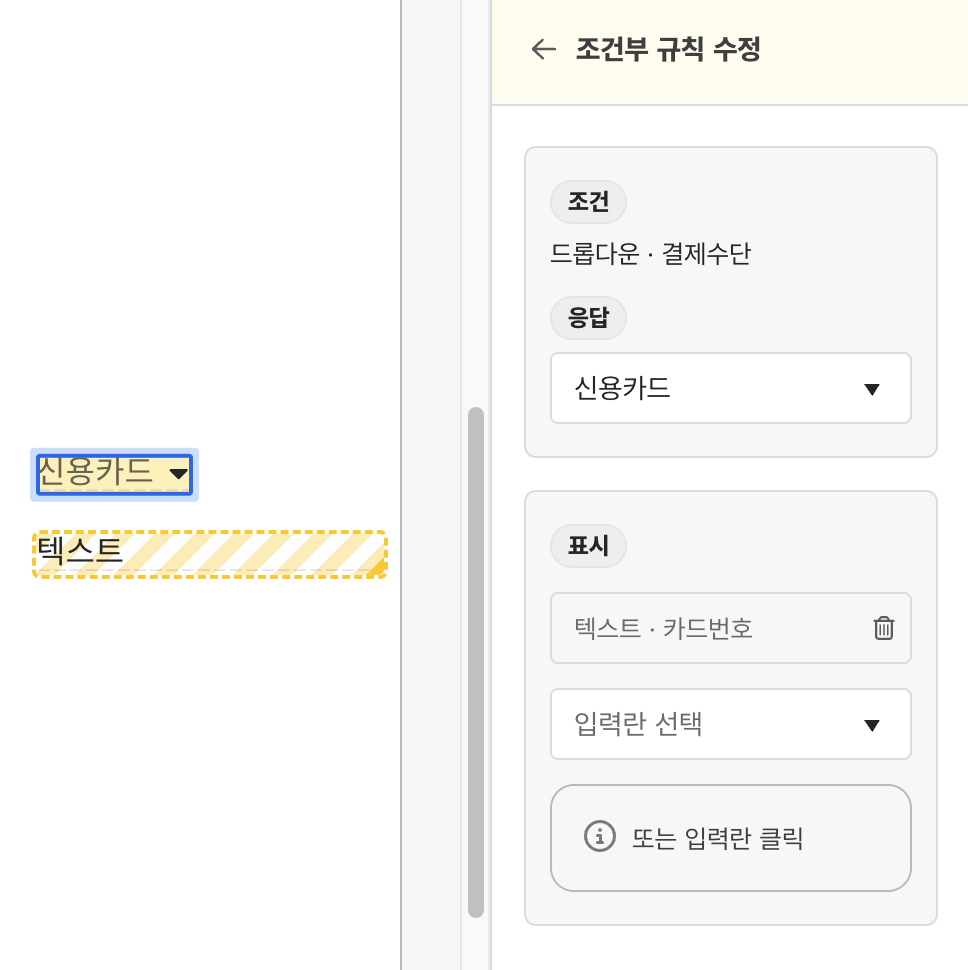
(참고) 예시 1을 모두싸인 웹에서 설정할 때의 모습
예시 2: 체크박스 선택에 따라 체크박스 그룹 표시하기
'약관동의' 체크박스 그룹의 '마케팅 동의'를 선택했을 때만 '수신채널' 그룹이 표시됩니다. 그룹이 대상이면 그룹 안의 체크박스가 함께 표시·숨김됩니다.
{
  "fields": [
    { "type": "CHECKBOX", "dataLabel": "마케팅동의", "groupLabel": "약관동의",
      "position": { "x": 0.1, "y": 0.4, "page": 1 }, "size": { "width": 0.02 } },
    { "type": "CHECKBOX", "dataLabel": "이메일수신", "groupLabel": "수신채널",
      "position": { "x": 0.1, "y": 0.5, "page": 1 }, "size": { "width": 0.02 } }
  ],
  "checkboxFieldGroups": [
    { "groupLabel": "약관동의", "minCheckRequired": 0 },
    {
      "groupLabel": "수신채널",
      "minCheckRequired": 0,
      "conditionalRule": {
        "triggers": [
          { "dataLabel": "마케팅동의", "groupLabel": "약관동의", "value": "TRUE" }
        ]
      }
    }
  ]
}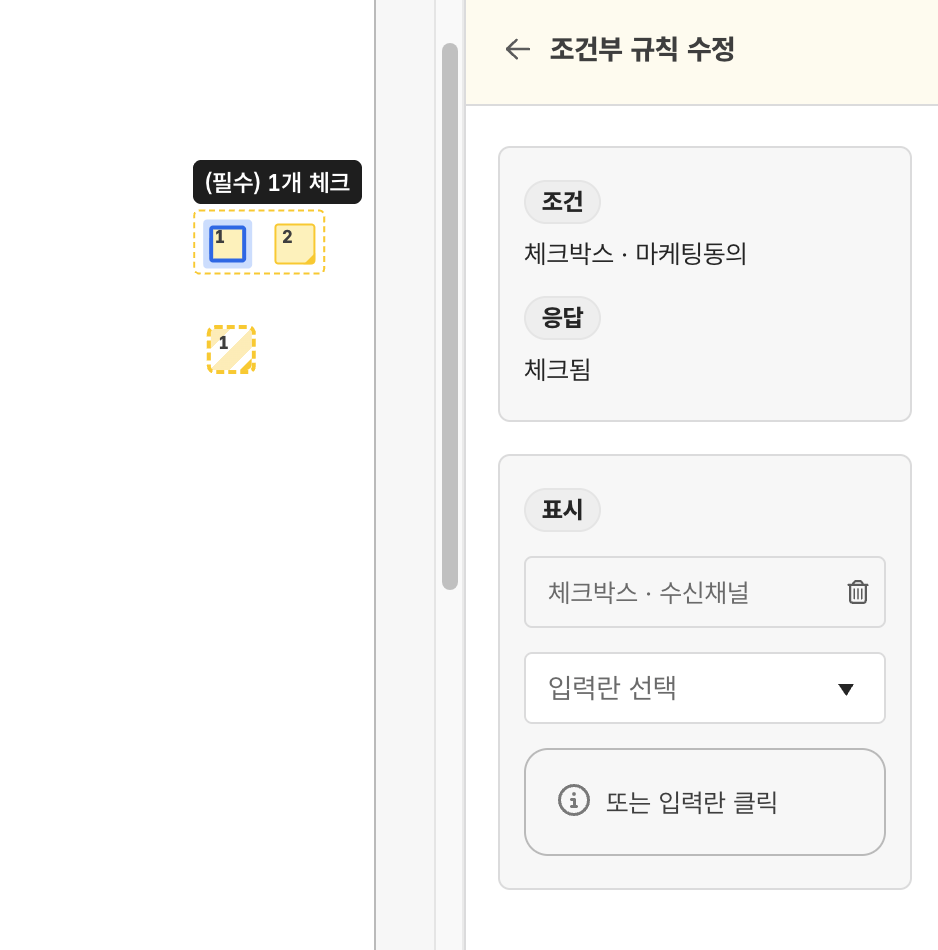
(참고) 예시 2를 모두싸인 웹에서 설정할 때의 모습
참고 사항
규칙은 최대 100개까지만 사용할 수 있으며, 앵커 텍스트 기반으로 배치되는 입력란, 한 번에 선택 체크박스로 지정된 입력란은 규칙의 조건으로 설정할 수 없습니다. 조건 입력란과 대상 입력란은 같은 서명자에게 할당된 입력란에만 설정 가능하며, 문서 편집 입력란은 조건 및 대상으로 설정할 수 없습니다.
오류 응답
규칙 설정 과정에서 반환될 수 있는 422 오류들은 아래와 같습니다.
ConditionalRuleCycleDetectedException: 규칙끼리 순환 참조될 경우ConditionalRuleParticipantScopeViolationException: 조건 입력란과 대상이 다른 참여자일 경우ConditionalRuleTargetLimitExceededException: 한 조건 입력란의 대상이 100개를 초과하는 경우ConditionalRuleTriggerValueNotAllowedException: 조건 입력란이 가질 수 없는 기대값이 설정된 경우ConditionalRuleCarrierNotAllowedException: 조건 또는 대상이 될 수 없는 입력란이 설정된 경우ConditionalRuleRequesterCarrierNotAllowedException: 문서 편집 입력란을 규칙으로 사용하는 경우ConditionalRuleOneClickTargetNotAllowedException: 한 번에 선택이 켜진 체크박스를 조건으로 사용하는 경우ConditionalRuleGraphSizeExceededException: 규칙 그래프가 4,000개 노드를 초과하는 경우ConditionalRuleFieldReassignmentException: 규칙에 걸린 입력란의 참여자를 변경하는 경우 (서명 요청 수정 시)ConditionalRuleOnAnchorFieldNotAllowedException: 규칙의 대상이 앵커 배치 입력란일 경우
오류 응답 예시:
{
  "instance": "/documents",
  "type": "ConditionalRuleTriggerValueNotAllowedException",
  "title": "Conditional rule trigger value is not allowed",
  "detail": "Trigger '결제수단' cannot have value '신용가드'. Allowed values: '신용카드', '현금'.",
  "data": {
    "dataLabel": "결제수단",
    "groupDataLabel": null,
    "value": "신용가드",
    "allowedValues": ["신용카드", "현금"]
  }
}